Reading time: minute(s)
 Deutsch
 English
 Français
FAQ - Frequently asked questions
In this section you will find answers to frequently asked questions. These are organized by subject area.
 General
How can I create a browser bookmark for PTV Map&Guide?
General
How can I create a browser bookmark for PTV Map&Guide?
|
Question: |
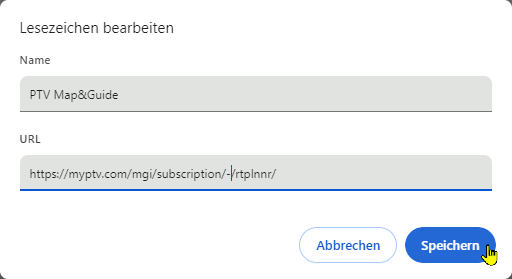
I would like to create a bookmark in my browser to access the route planner. However, the address of the website contains a long, untraceable character string. This string is dynamic. This means that the link may be invalid the next time I try it. |
|
Answer: |
|
| Result: | The next time the bookmark is called up, the character string is regenerated, but the link in the bookmark does not lose its validity. |

 Data management
Which coordinate formats can I import into the data management?
Data management
Which coordinate formats can I import into the data management?
|
Question: |
My import in the data manager fails. A message alerts me to possible data format problems. What format must the coordinates of the addresses to be imported be in? |
|
Answer: |
A point on a map is always described by a pair of coordinates, the latitude and the longitude. In PTV Map&Guide, addresses can be imported and geocoded based on their coordinates. The following coordinate formats can be used for the import:
|
Tender+
Which coordinate formats can I use in Tender+?
|
Question: |
What format must my coordinates have so that I can perform an automatic calculation with Tender+? |
||||||||
|
Answer: |
A point on a map is always described by a pair of coordinates, the geographic latitude and the geographic longitude. In Tender+, addresses can be imported and geocoded based on their coordinates. To do this, enter the longitude in the “Longitude” column and the latitude in the “Latitude” column. The following coordinate formats can be imported:
|